
A real inbox for your Resend domains.
Resend sends your email but has nowhere to read the replies. Paste your API key, import your history, and get threads, search, and scheduled send for every domain.
Everything you need in an email client
Not a toy. A full-featured inbox built for teams that use Resend to send and receive email.
Bring your own key
Your Resend API key, your infrastructure. We never touch your DNS or sending reputation.
Inbox per domain
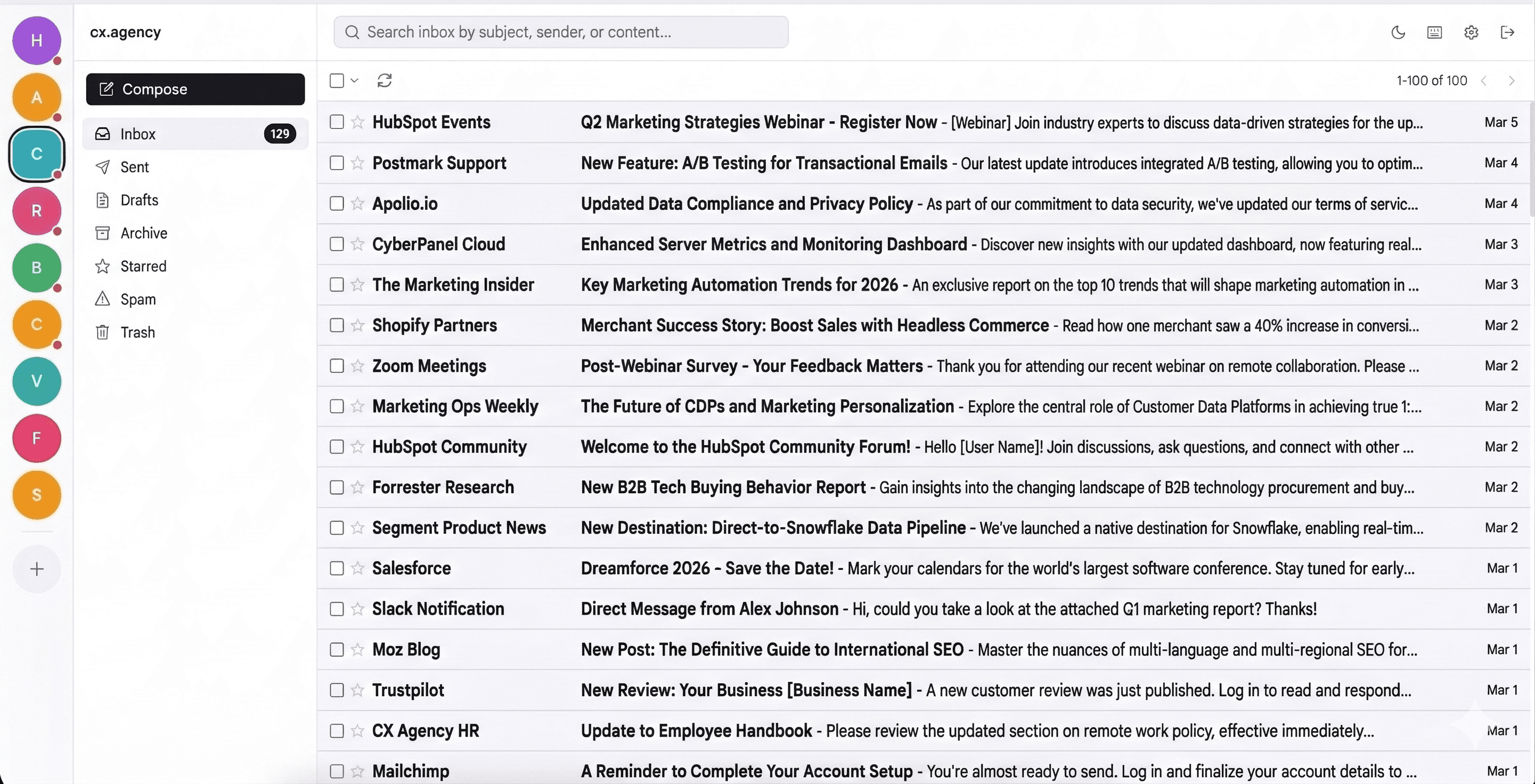
Discord-style sidebar. Switch between domains instantly. Each one gets its own inbox.
Full email history
Import every sent and received email from Resend. Threaded automatically by headers and subject matching.
Real-time delivery
New emails arrive instantly via webhooks. No refresh, no polling. Cross-tab sync keeps everything consistent.
Team management
Invite teammates, assign roles (admin/member), manage shared aliases like support@ or hello@.
Spam filtering
Built-in spam scoring based on SPF, DKIM, DMARC, and header analysis. Bad emails stay out of your inbox.
Compose & reply
Floating compose window with rich text and Cmd+Enter to send. Reply, reply-all, forward. Drafts auto-save as you type.
Undo send
Hold every send for 5, 10, or 30 seconds - your choice. Click Undo on the toast and the email never leaves.
Scheduled send
Write now, send tomorrow morning - or any time up to 30 days out. Cancel a scheduled send and keep the draft.
Snooze
Snooze a thread until later today, tomorrow, or next week. It comes back to your inbox when it's due.
Rules & auto-replies
Forward inbound mail per alias. Auto-reply with optional time windows. Loop-guarded, with org-level policy controls.
Signatures
Rich HTML signature per user, inserted automatically on compose and reply.
Full-text search
Search subject, body, and participants with operators: from:, to:, has:attachment, before:, after:. Scoped per folder or domain.
Star & organize
Star important threads, archive what's done, trash what's not. System folders plus custom labels.
Drag & drop
Drag threads to any sidebar folder. Multi-select and bulk move. Reorder domains by dragging.
Attachments
Attach files up to 10MB. Dangerous file types blocked by extension and MIME type. Safe downloads enforced.
Dark & light mode
Follows your OS preference. Toggle anytime. Email content renders on white background to preserve sender design.
Desktop notifications
Native browser notifications for new emails. Bounce and failure alerts. Tab title shows unread count.
Keyboard shortcuts
Gmail-style shortcuts: j/k to navigate, e to archive, # to trash, Cmd+N to compose, / to search.
Custom labels
Create labels, apply them to threads, filter by label. Rename or delete - all references update right away.
Delivery tracking
Outbound status badges: Queued, Sent, Delivered, Bounced. Failed sends land in a Failed view with one-click retry.
Bounce protection
Hard bounces block the bad address automatically. Blocks expire after 30 days. Admins can unblock anytime.
Session control
See every active session on your account and revoke any of them. One click signs that device out.
MCP for agents
Connect Claude Code or any MCP client. Agents read, search, and write drafts - sending stays off until you turn it on.
One app, every domain
Switch between domains like Discord channels. Each domain gets its own inbox, sent folder, and archive. Keyboard shortcut Cmd+1-9 to jump between them.
- Unread badge per domain
- Drag to reorder sidebar icons
- Toggle domain visibility in Settings
- Domain heartbeat monitors DNS health
Running in 2 minutes
Four-step wizard. Paste your API key, pick your domains, set up your team, import your history. No DNS changes. No config files.
Start onboardingZero-delay delivery
Resend webhooks hit your server. Your server pushes to your browser over WebSocket. New mail appears without refreshing. Self-hosting without a public URL? Optional auto-poll fetches new mail on a schedule you set.
- WebSocket sync - new emails and actions appear instantly
- Cross-tab sync via BroadcastChannel
- Offline detection with automatic reconnect
- Native browser notifications for new mail and bounces
- Delivery tracking: Queued, Sent, Delivered, Bounced
- Webhook signatures verified via HMAC
Your agent gets an inbox too
Connect Claude Code, Codex, or opencode over MCP. Your agent reads mail, searches threads, and writes drafts - as you, with your permissions, on your model tokens.
- Drafts first: the agent writes, a human reviews and sends
- Agent send is one org-level switch, off by default, enforced server-side
- OAuth 2.1 browser approval, or an API key for any client
- Same permission model as the app - an agent can never see more than its user
- Revoke any connection anytime in Settings
One command. It opens your browser, you approve, and it creates one revocable API key - no pre-made key needed. Then it configures Claude Code, Codex, and opencode.
Privacy is not a feature toggle
Tracking protection is on by default. Your API key is encrypted at rest. We built the security layer before the compose button.
Tracking parameter stripping
48+ tracking parameters removed automatically: UTM, Facebook (fbclid), Google (gclid), TikTok, LinkedIn, HubSpot, Mailchimp, and more. Marketers can't track your clicks.
External image blocking
Tracking pixels and remote images blocked by default. Click "Load Images" per-email when you want them. Embedded images always display.
HTML sanitization
Server-side sanitization on all inbound email. Strict allowlist: safe tags and CSS only. Scripts, forms, iframes, event handlers, and CSS url() values are stripped. All links open in new tabs with noopener.
AES-256-GCM encryption
Your Resend API key is encrypted at rest with AES-256-GCM. JWT auth with httpOnly cookies. Token blacklisting on logout and password change.
Attachment safety
Dangerous file types blocked by extension AND MIME detection. Renaming .exe to .txt won't bypass it. Safe downloads with enforced content types.
Rate limiting & attack protection
Rate-limited auth endpoints, XSS prevention, input validation, and CSRF protection built in. You handle email - we handle the threat surface.
Built for teams or individuals
Role-based access control. Members only see threads from their assigned aliases. Admins see everything.
Keyboard shortcuts
Gmail-style shortcuts. Navigate, act, compose - without touching your mouse. Press ? to see them all.
Navigation
Actions
Compose & select
Cloud or self-hosted. Same product.
Self-host with Docker Compose or your own setup. Every feature works in both modes - including the MCP server.
Cloud
We handle everything
$5/month per organization - unlimited members, unlimited domains
Get startedSelf-Hosted
Your server, your data
Free - open source, no license fees, no per-seat pricing
Frequently asked questions
Resend sends your email.
We give you the inbox.
Paste your API key and start reading in minutes.
Get started